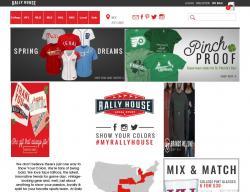
Here are my results for my artifact 6, where I was testing 3D based websites on movies and games.
Iron Man 2
- No first initial problems
- Blue, red and gold
Blue, red and green
Grey and green
- Navigation no problems
- Images are clear
- Factor levels all okay
- No imagery missing
Angle of images causes problems
Toy story 3
- No initial problems
Page too busy
- Nav colour Red
- Navigation no problems
Contrasting colours work well
- Images are clear
- Factor levels all okay
- No imagery missing
Borderlands
- No initial problems
- Nav colour Red and 1 person saw green.
- Navigation no problems
- Images are clear
background not so clear
High levels of contrast works well.
- Factor levels all okay
- No imagery missing
- Icon colour red, 1 person saw brown/green
Guitar Hero: World tour
- No initial problems
- Main colours on screen red, grey and yellow another saw red, green and grey
- Navigation no problems
- Images are clear
- Factor levels all okay, high levels work well.
- No imagery missing
- Red background causes no probs
From this i have found that even though some of the users see colours as another colour for example seeing red as green, the high levels of contrast work well so that users can still identify the shape and and the image is meant to be. The users tested could still see and work the navigation due to it's high contrast again. Some users found that the backgrounds was too busy and there was too much going on, on the page. But i have noticed that using a high contrast when designing is compulsary as this enables people with colour deficiencies to view your webpage and works almost every time even if they cannot see the original colour used.
Thursday, 13 May 2010
Artifact 6 Results
Posted by < k a t i e > at 12:26 PM 0 comments
Labels: prp
Thursday, 29 April 2010
Artefact 6
Posted by < k a t i e > at 11:09 AM 0 comments
Labels: prp
Wednesday, 21 April 2010
Artefact 5 Results
For my 5th artefact I was testing an coloured image and adjusting the saturation and brightness levels to see if it made any difference to a colour deficient person finding out whether they could distinguish that there are multiple colours within a picture.
Here is the original image.
So just to test to see what brightness and saturation alone does to the image, i wanted to know how people see the image and whether it helped with reconising different colours.
Test 1
Comparing to the original image.
Results:
Saturation - slightly different shades of green, not much difference.
Brightness - Yellow is more distinct, different shades of green, some can tell there is meant to be 3 different colours but majority thinks there is 2 green peppers.
------------------------------------------------------------------------------------------------
The following tests i want to see what the colours the users can see, and whether they can tell that there is meant to be 3 different colours, I want to find what saturation and brightness combination works best with a colourful image like this.
Test 2

Posted by < k a t i e > at 9:00 PM 0 comments
Labels: prp
Thursday, 15 April 2010
Thursday, 18 March 2010
Client update
I going to have a meeting with my client to retrieve more information to put within the website and to show him what i have made so far with the deadline being next week. So i am going ot see if he wants to make any last minute changes.
Posted by < k a t i e > at 12:26 PM 0 comments
Labels: client
Artifact 5
After my last 2 set of results the answer i have received have related to the high contrast in colours that should be used. Although some of the colours do not mix well and can cause problems for people such as eye tiredness and strain.
Posted by < k a t i e > at 11:59 AM 0 comments
Artefact 4 results
For my fourth artifact I created 4 pages monochrome, red/green, blue/orange and yellow/violet. With the monochrome I was testing to see if people could see all information available to them. If this caused no problem then I changed the colours to the colour wheel complementary colours and see if any problems occurred. Here is what I found within my results. (1) Monochrome Is all the information on the page easily viewable by you as the user? For example: logo, images, text colour banners and etc. 10 = Yes 2 = No Comments Hard to identify the images. 12 = Yes (2) Red/ Green Is all the information on the page easily viewable by you as the user? For example: logo, images, text colour banners and etc. 10 = Yes 2 = No Comments Struggled with the banner, with them being colour deficient. Can you easily read the logo and text on the background colours used upon the page? 11 = Yes 1 = No Comments Can read the text but not the logo. 1 prefered the monochrome as information was clear. (3) Blue/ Orange Is all the information on the page easily viewable by you as the user? For example: logo, images, text colour banners and etc. 12 = Yes Can you easily read the logo and text on the background colours used upon the page? 12 = Yes (4) Yellow/ Violet Is all the information on the page easily viewable by you as the user? For example: logo, images, text colour banners and etc. 11 = Yes 1 didn’t answer. Can you easily read the logo and text on the background colours used upon the page? 12 = Yes Comments Yellow and white together are not good combinations Colours too bright. Within my results i found that even though people can see all information in the monochrome page, adding certain colours can still cause problems and the main colour problem was the red and green colours. Colour deficiencies are effected by the hue, and within my last set of results someone mentioned that the contrast should be set high for things to be more viewable to users. For my next artifact, i am going to test and see whether the saturation and brightness can have any effect on the way people with colour deficiencies view things upon the web. I am going to try this test on a range of images and see what outcome this brings. I want to see whether a low saturation or a high saturation helps people in any way at all or if it has no effect.
Posted by < k a t i e > at 11:32 AM 0 comments
Labels: prp